Secrets of the AI Ninjas: The easy way for beginners to level up their AI results
When you’re playing around with ChatGPT or Gemini for the first time, it’s easy to just toss in a quick, simple prompt and see what happens.
“What can I make for dinner?”. The odds are that you will get some OK ideas. But that’s about the extent of what you can hope for— OK. And many people never get beyond simple prompts with junky responses.
Instead, think of ChatGPT like a highly skilled chef: if you give vague instructions you might get something edible but random. If you give clear, specific directions (“Make a gluten-free vegetarian lasagna with extra basil”), you’re far more likely to get exactly what you want.
The people that really make AI sing—the AI Ninjas— know that ChatGPT and Google’s Gemini are only as smart as you make them, and that creating better prompts is the only way to get better answers.
While working with an AI tools company, I made a detailed study of the science of writing better prompts. It took me while to wade through scientific and academic papers to uncover the secrets of AI prompt writing.
Here’s how you can level up your prompts to get sharper, more relevant, and more useful results—without needing to be a “prompt engineering” expert—or reading all those dense studies.
Step 1: Give it context
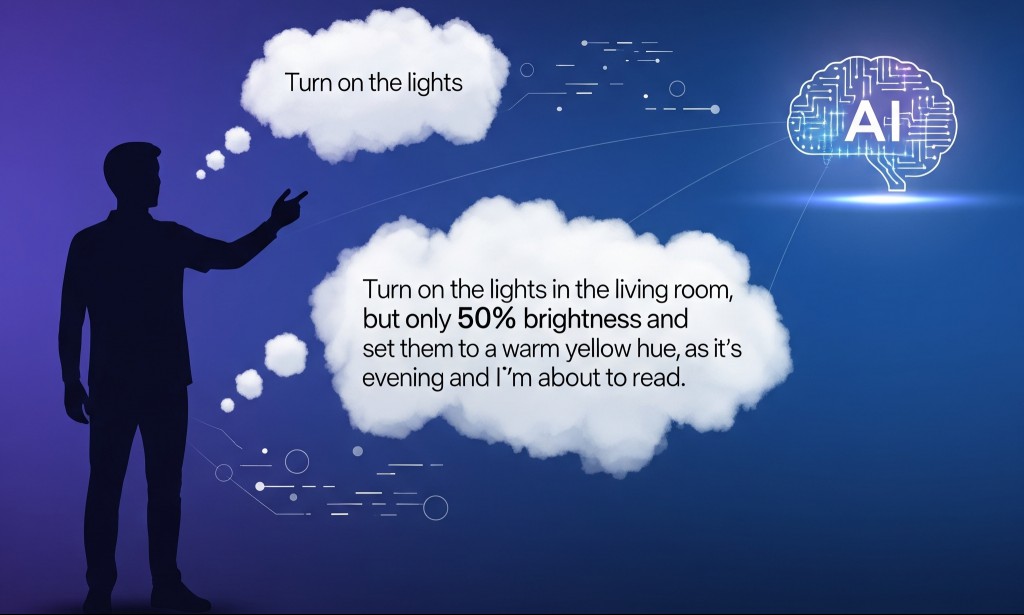
When you tell ChatGPT what to do, don’t just describe the task. Include the context.
Instead of:
“Write me a post about productivity.”
Try:
“Write a friendly LinkedIn post about productivity tips for remote software developers, 100–150 words, focusing on how to avoid burnout.”
The extra details—audience, tone, length, and focus—act like GPS coordinates that guide ChatGPT toward your ideal destination.
Step 2: Include these key details
Here’s the magic formula for a high-quality prompt:
| Element | Why It Matters |
|---|---|
| Task | Tells the AI what type of thing to produce (blog, email, script, etc.) |
| Target Audience | Shapes the language, tone, and complexity |
| Goal/Purpose | Makes sure the content is aimed at the right outcome |
| Tone/Style | Controls whether it sounds casual, professional, funny, formal, etc. |
| Format | Dictates structure (bullets, paragraphs, slides, etc.) |
| Length | Keeps it the right size |
| Key Points | Ensures nothing important gets left out |
| Sources/Input | Makes the content factually grounded or aligned with your material |
| Constraints | Avoids unwanted words, styles, or perspectives |
Recently I was using Chat GPT to plan a short trip to Lima Peru. I started out asking about things to do in Lima and got some nice ideas. But as I overlayed information about my wife’s and my interests and dislikes, the information got progressively better.
More art and history less shopping. Good local food but not fancy Michelin star restaurants. Finally, I uploaded the links to four or five articles that I thought were particularly good and asked the engine to update the results again.
The results were excellent and I outputted it to my phone.
Bonus AI Ninja trick:
You can ask Chat GPT or Gemini to grade its own work. I regularly ask the AI engines how confident they are in their answers and what other information would make the answers better.
For example, when I tried this on a history-related question, Chat GPT admitted that it could not access JSTOR which is an academic database or certain museum databases.
A user could download information from those libraries, if they had access, and ask the AI engine to recalculate its answers.
Step 3: Use a fillable template for consistency
If you regularly use ChatGPT, you don’t want to re-think your prompt structure every single time. That’s where a Prompt Builder template comes in.
Here’s one you can copy and fill in whenever you need:
Prompt Builder template
Task Overview:
What do you want to create or do?
Target Audience:
Who is this for? (age, role, industry, knowledge level, etc.)
Goal / Purpose:
What do you want this to achieve?
Tone / Style:
How should it sound? (professional, casual, persuasive, witty, etc.)
Output Format:
What kind of output do you need? (blog post, tweet, email, bullet list, slide outline, etc.)
Length / Depth:
How long or detailed should it be?
Key Points to Include:
Any must-have ideas, data, or specific messages?
Sources or Input Materials:
Paste or link any data, references, text, or files to base the output on
Constraints or Exclusions:
Anything to avoid? (jargon, clichés, brand rules, etc.)
Step 4: Turn your template into a prompt
Once your template is filled out, you can plug it into the newly launched GPT 5, Gemini or any of the other top AI chatbots currently on the market, in one go:
“Write a [tone/style] [output format] for [target audience] that aims to [goal/purpose]. It should be [length/depth] and include [key points]. Base it on [sources]. Avoid [constraints].”
Final tip: Separate setup from task
If you’re working on something multi-step (like a report, a campaign, or a big article), start with a setup message where you AI all the background with the template above. Then, in your next message, give it the specific task. This makes follow-ups easier:
“Use the same tone and audience as before, but now write a conclusion section.”
The quality of your AI output depends on the clarity of your input. Give it the who, what, why, and how—and you’ll be amazed at how much better the results become.
AI disclaimer: This article is primarily written by the author, while GPT 5 was used to draft certain aspects.



Comments on "Secrets of the AI Ninjas: The easy way for beginners to level up their AI results" :